


Bài viết nổi bật, Công nghệ, Đọc gì hôm nay, Ebook - chia sẻ
How to Crack Remote Desktop Service on Windows Server 2012 R2 / Windows Server 2016
Th8
How to Crack Remote Desktop Service on Windows Server 2012 R2 / Windows Server 2016

Here I wanna show u how to crack RD Services on Windows Server 2012 R2 / Windows Server 2016
As u know RD Services one of the popular service in Windows Server,
But it requires a licensing service,
This license is called Remote Desktop Services client access licenses (RDS CALs), and it’s required some money to obtain RDS CALs, per device or per user basis.
By default, No RDS CALs are required for up to 2 users to access instances of the server remotely at once.
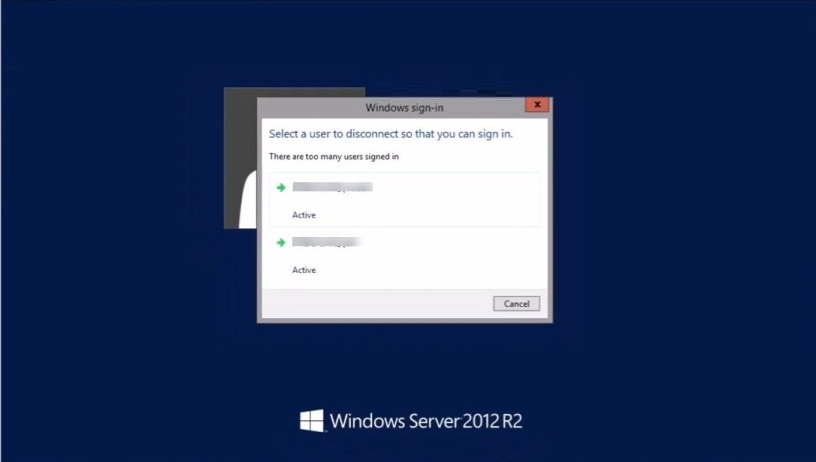
As you see, 2 users already logged on to the server.

If you wanna 3rd users to connect remotely,
Microsoft would say “Please install Remote Desktop Services” and activate it!
And here, what happens when third user tries to connect to the server using a RDP connection

So what you have to do, to “crack” RD service?
You can removing concurrent sessions limit actually is pretty easy.
All you need to find “termsrv.dll” file on the path
“C:\Windows\System32”
and replace it with the “cracked” file.
FIRST: Stop “Remote Desktop Services”
Open Run > Type “Services.msc” > Find the service “Remote Desktop Services” and Stop it

SECOND: Take ownership termsrv.dll in c:\Windows\system32.
By default its TrustedInstaller
1. Change the ownership


2. Add your current user and change its permissions 


THIRD: After completing step 2.
Replace “termsrv.dll” file on the path “C:\Windows\System32”
with the cracked file


FOURTH: Start the Service“Remote Desktop Services”

Now, let’s see the result!